 AI GIF Generator
 Free GIF Tools
 AI Video Effects
 AI Image Effects
Reverse GIF
Upload GIF
Click to upload or drag and drop
Only supports .gif files
Reversing ModeReverse Only
Choose how the animation sequence should play back.
Playback Speed1x Speed
Output FormatGIF
Reverse GIF Online in Seconds
Play your animations backwards or loop them in ping-pong mode instantly. Our free GIF reverser gives you full control over playback speed and format with zero quality loss and no watermarks.
No credit card required
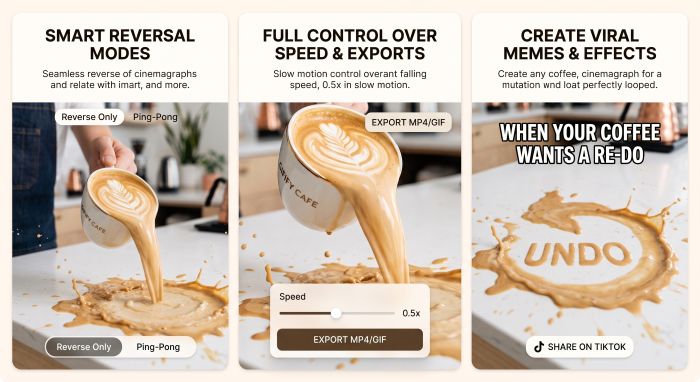
Smart Reversal Modes for Flawless Loops
Flip the timeline completely with Reverse Only to run your animation from end to start, or choose Ping-Pong to bounce back and forth seamlessly. Whether you want an endless rewind loop or a seamless back-and-forth reaction, this online gif reverse tool keeps the motion fluid and completely glitch-free.
Full Control Over Speed and Export Formats
Adjust the energy of your clip before exporting. Slow things down to 0.5x for dramatic rewind reveals, or crank it up to 2.0x for rapid-fire comedic timing. When you are done, save your work as a crisp GIF animation ready for messaging apps, or convert it to a lightweight MP4 video tailored for Instagram, TikTok, and Discord.
Create Viral Memes, Reaction GIFs, and Rewind Effects
Turn ordinary moments into scroll-stopping content. Use the GIF reverser to create hilarious "undo" memes—like spilled coffee leaping back into a mug, dogs moonwalking backwards, or dramatic sports fails in slow rewind. It is the easiest way to give existing animations an unexpected, comedic twist for social feeds and group chats.
How to Reverse a GIF in 3 Easy Steps
Step 1 – Upload Your GIF
Drag and drop your .gif file into the upload box, or click to browse from your device.
Step 2 – Choose Mode, Speed & Format
Select Reverse Only or Ping-Pong, tweak the playback speed from 0.5x to 2.0x, and pick your preferred output (GIF or MP4).
Step 3 – Convert & Download
Hit the action button to process your clip in seconds, then download your reversed animation ready to share.
No credit card required
Frequently Asked Questions
What is the difference between Reverse Only and Ping-Pong mode?
Reverse Only plays your animation strictly from the last frame back to the first frame. Ping-Pong mode plays the animation forward first, then immediately plays it in reverse, creating a seamless bounce-back loop.Will reversing a GIF reduce its image quality?
No. Our tool processes the original frames and simply flips their sequence, preserving the native color palette, resolution, and sharpness without compression artifacts.Can I export the reversed animation as a video?
Yes. You can export directly as an MP4 video instead of a GIF, which significantly reduces file size and makes it easier to share on platforms like Instagram, Discord, or TikTok.Is this GIF reverser completely free to use?
Yes, it is 100% free with no hidden paywalls, no daily limits, and zero watermarks added to your downloaded files.Are my uploaded GIF files secure and private?
Absolutely. Your files are processed securely in your browser session and are automatically deleted from our servers right after processing. We never store, share, or view your uploaded media.