 AI GIF Generator
 Free GIF Tools
 AI Video Effects
 AI Image Effects
Expand & Uncrop Images with AI Image Extender
Use AI expand image to uncrop photos, extend backgrounds, and resize images to different aspect ratios—perfect for social media, banners, or wide compositions.
No credit card required
Expand Social Media & Product Images with AI
Want to make your Instagram stories, TikTok posts, or product visuals fit perfectly without awkward cropping? Our AI Image Extender can quickly expand your images while keeping every detail sharp and natural. Simply upload your photo, select the desired aspect ratio, and let AI fill in the extra space. Whether you’re creating banners, posts, or product images, you’ll get high-quality visuals ready to share instantly.
Uncrop and Restore Family Photos Effortlessly
Lost some parts of your favorite family photos or personal snapshots? Our AI Image Expander can uncrop and restore them seamlessly. By analyzing existing pixels, AI fills in missing details to complete the scene naturally. Relive special moments exactly as you remember them—without losing quality. Perfect for printing, sharing with family, or preserving precious memories.
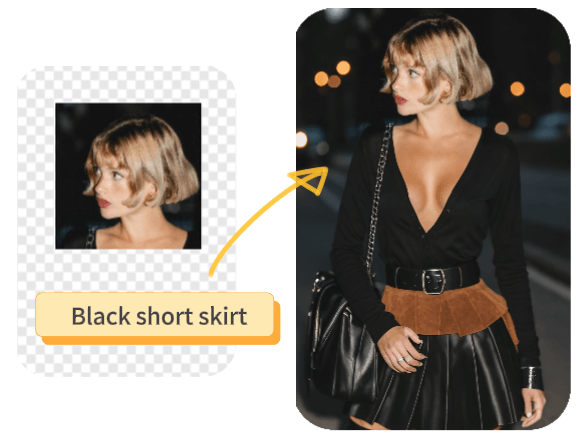
Expand Photos Creatively with AI Prompts
Turn ordinary photos into unique and creative visuals. With text prompts, you can guide AI to expand backgrounds, add artistic elements, or craft entirely new scenes. Ideal for posters, invitations, social media content, or personal projects. Experiment with different prompts and explore endless possibilities—your photos can be anything you imagine.
Free AI Image Expansion—No Sign-Up
Experience the full power of AI Image Extender for free, right in your browser. No sign-ups, no downloads, and no hidden fees. Just upload your photo, select a ratio, and watch AI extend your image naturally in seconds. Perfect for anyone who wants high-quality results quickly, whether for work, social media, or personal projects.
How to Use AI Image Extender?
Step 1: Upload your image
Start by uploading the image you want to expand. You can use any portrait, landscape, or product photo. Our AI Image Extender works directly in your browser—no downloads or sign-ups needed.
Step 2: Choose Ratio & Add Prompts
Select the aspect ratio you want for your image. For creative expansions, you can also add text prompts to guide AI in extending backgrounds or adding elements. Watch the preview update instantly.
Step 3: Generate & Download
Click “Generate” and let AI expand your image naturally. Once satisfied with the result, download your photo instantly. Enjoy high-quality, extended images ready for social media, prints, or personal projects.
No credit card required
FAQs About AI Image Extender
What is AI Image Extender?
AI Image Extender is a tool that allows you to expand or uncrop your photos effortlessly. It uses AI to fill in missing details and extend image backgrounds naturally, keeping every detail sharp.Can I use it for free?
Yes! Our AI Image Extender is completely free and works right in your browser. No sign-up or download is required.What types of photos can I expand?
You can expand portraits, landscapes, product photos, or even family snapshots. AI works in any direction and adapts to different image types.Can I add creative elements when expanding?
Absolutely! You can provide text prompts to guide AI in expanding backgrounds, adding artistic details, or creating unique scenes.Will my photo lose quality when expanded?
No. Our AI Image Expander preserves the original quality while naturally extending your image, so your photos remain sharp and clear.How long does it take to expand an image?
Usually just a few seconds, depending on your image size. The process is fast, easy, and happens entirely in your browser.Do I need any special software or skills to use it?
Not at all. AI Image Extender is user-friendly and designed for everyone. Just upload your photo, choose a ratio, and generate—no prior skills required.