 AI GIF Generator
 Free GIF Tools
 AI Video Effects
 AI Image Effects
AI Video Transition
Model
 Google Veo3.1 Lite




Upload Images
Add End Frame
Support upload format: jpg,jpeg,png,webp, images up to 10 MB
Prompt
0 / 1000✖
Duration
4s
6s
8s
Resolution
720p
1080p
4k
Aspect Ratio
- Auto
- 16:9
- 9:16
🎁Log in daily to claim up to 29 credits!
Create Smooth AI Video Transitions from Two Photos
Upload a starting image and an ending image, and Gifify will turn them into a seamless transition video with natural motion and cinematic flow. Perfect for glow-ups, outfit changes, travel memories, couple edits, and creative social posts.
AI Video Transitions That Make Photo Changes Feel Real
Sometimes two photos already tell a story — Gifify just helps connect them. It turns a starting image and an ending image into a smooth AI video transition, so the change feels natural instead of abrupt.You can also add a simple creative description to guide the result — like how the scene should move, the mood, or the style. This helps the transition feel more personal and closer to what you have in mind.The final video feels more like a real moment unfolding than a basic slideshow, and works well for sharing on TikTok, Reels, or Shorts.
Natural Motion, Consistent Characters, and Cinematic Effects
Gifify keeps faces, characters, and key visual details consistent throughout the AI video transition, so the change between two images feels smooth and believable. With natural motion and subtle camera movement, the result looks more like a real short video than an edited cut.It works especially well for creating AI growing up transition effects, where a childhood photo slowly transforms into an older version, or any visual “before and after” story that needs a continuous, flowing change.
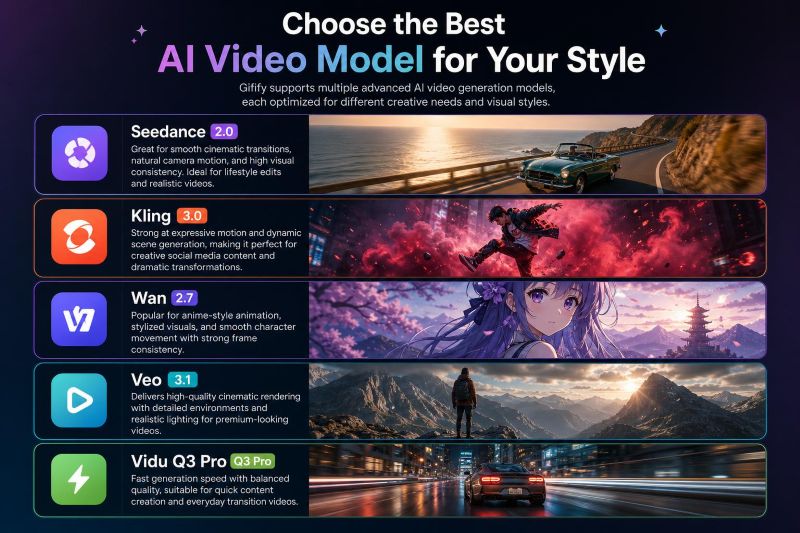
Choose the Best AI Video Model for Your Style
Gifify supports multiple advanced AI video generation models, each optimized for different creative needs and visual styles.
● Seedance 2.0 — Great for smooth cinematic transitions, natural camera motion, and high visual consistency. Ideal for lifestyle edits and realistic videos.
● Kling 3.0 — Strong at expressive motion and dynamic scene generation, making it perfect for creative social media content and dramatic transformations.
● Wan 2.7 — Popular for anime-style animation, stylized visuals, and smooth character movement with strong frame consistency.
● Veo 3.1 — Delivers high-quality cinematic rendering with detailed environments and realistic lighting for premium-looking videos.
● Vidu Q3 Pro — Fast generation speed with balanced quality, suitable for quick content creation and everyday transition videos.
● Seedance 2.0 — Great for smooth cinematic transitions, natural camera motion, and high visual consistency. Ideal for lifestyle edits and realistic videos.
● Kling 3.0 — Strong at expressive motion and dynamic scene generation, making it perfect for creative social media content and dramatic transformations.
● Wan 2.7 — Popular for anime-style animation, stylized visuals, and smooth character movement with strong frame consistency.
● Veo 3.1 — Delivers high-quality cinematic rendering with detailed environments and realistic lighting for premium-looking videos.
● Vidu Q3 Pro — Fast generation speed with balanced quality, suitable for quick content creation and everyday transition videos.
How to Create an AI Video Transition?
Step 1 – Upload Your Two Images
Choose a starting photo and an ending photo. These can be portraits, product shots, or any two images that represent a change you want to show.
Step 2 – Add a Creative Description
Write a short prompt to guide the transition style, like smooth, cinematic, slow zoom, or dreamy motion.
Step 3 – Generate and Download Your Video
Click generate and wait a few seconds. Gifify will create your AI video transition, ready to download and share on social media platforms.
AI Video Transition Generator – Frequently Asked Questions
What is an AI video transition?
An AI video transition is a short video that smoothly connects two images, showing a natural change from one scene to another instead of a hard cut.Do I need editing skills to use this AI video transition tool?
No. You just upload two images, and Gifify automatically generates a smooth transition video. No editing experience needed.Can I customize the AI video transition style?
Yes. You can add a simple creative description to guide the motion, mood, or overall style of the transition.What images work best for AI video transitions?
Clear images with visible subjects work best, such as portraits, selfies, or product photos with a defined focus.What is Seedance 2.0 and when should I use it?
Seedance 2.0 is one of the most popular models for AI video transitions. It focuses on smooth motion, stable character consistency, and natural camera flow. It works especially well for realistic “before-and-after” videos where you want the change to feel subtle, clean, and cinematic rather than exaggerated. If you want a natural-looking transition that feels close to real footage, Seedance 2.0 is usually the best starting choice.What other models can I choose besides Seedance 2.0?
Gifify also supports Kling 3.0 for more dynamic motion, Wan 2.7 for anime-style visuals, Veo 3.1 for cinematic rendering, and Vidu Q3 Pro for faster generation. Each model offers different visual styles, so you can pick based on whether you prefer realism, animation, or speed.